Login Page
Screenshot
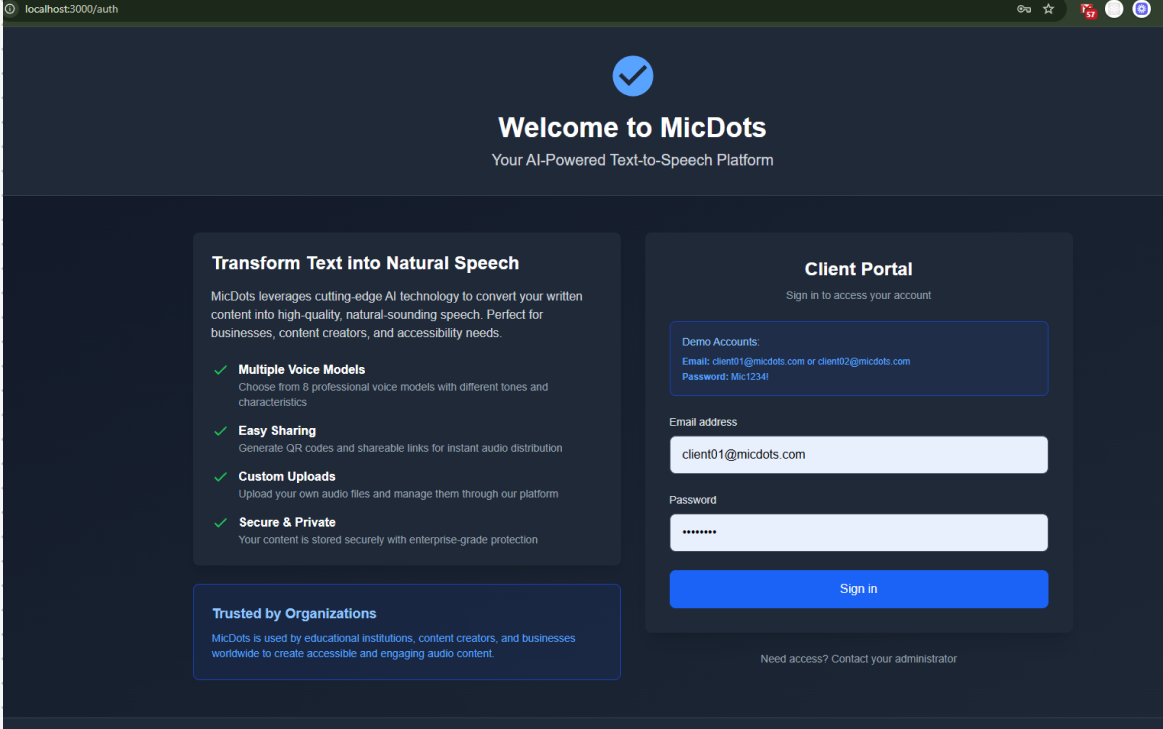
Add your login page screenshot to docs/authentication/img/login-page.png
Overview
The login page is the entry point for authenticated users to access the MicDots platform. It provides a secure authentication mechanism and clear user experience.
Task Checklist
Role Color Legend
| # | Task | Role | Status | Details |
|---|---|---|---|---|
| 1 | Create login page mockup/design | Frontend | ⏳ Pending | View Details |
| 2 | Design responsive layout | Frontend | ⏳ Pending | Coming Soon |
| 3 | Create welcome header with branding | Frontend | ⏳ Pending | Coming Soon |
| 4 | Design email and password inputs | Frontend | ⏳ Pending | Coming Soon |
| 5 | Design sign in button with states | Frontend | ⏳ Pending | Coming Soon |
| 6 | Add contact administrator link | Frontend | ⏳ Pending | Coming Soon |
| 7 | Create demo account info section | Frontend | ⏳ Pending | Coming Soon |
| 8 | Set up login page route | Frontend | ⏳ Pending | Coming Soon |
| 9 | Create Login component structure | Frontend | ⏳ Pending | Coming Soon |
| 10 | Implement email input with validation | Frontend | ⏳ Pending | View Details |
| 11 | Implement password input with toggle | Frontend | ⏳ Pending | Coming Soon |
| 12 | Add client-side form validation | Frontend | ⏳ Pending | Coming Soon |
| 13 | Implement loading state | Frontend | ⏳ Pending | Coming Soon |
| 14 | Add error message display | Frontend | ⏳ Pending | Coming Soon |
| 15 | Implement success redirect | Frontend | ⏳ Pending | Coming Soon |
| 16 | Make page responsive | Frontend | ⏳ Pending | Coming Soon |
| 17 | Add accessibility features | Frontend | ⏳ Pending | Coming Soon |
| 18 | Create authentication API endpoint | Backend | ⏳ Pending | View Details |
| 19 | Implement JWT token generation | Backend | ⏳ Pending | Coming Soon |
| 20 | Add password hashing/verification | Backend | ⏳ Pending | Coming Soon |
| 21 | Implement rate limiting | Backend | ⏳ Pending | View Details |
| 22 | Add login attempt tracking | Backend | ⏳ Pending | Coming Soon |
| 23 | Create session management | Backend | ⏳ Pending | Coming Soon |
| 24 | Implement refresh token mechanism | Backend | ⏳ Pending | Coming Soon |
| 25 | Add logout endpoint | Backend | ⏳ Pending | Coming Soon |
| 26 | Implement HTTPS-only cookies | DevOps | ⏳ Pending | View Details |
| 27 | Add CSRF protection | Backend | ⏳ Pending | Coming Soon |
| 28 | Implement password requirements | Backend | ⏳ Pending | Coming Soon |
| 29 | Add account lockout after failures | Backend | ⏳ Pending | Coming Soon |
| 30 | Add security headers | DevOps | ⏳ Pending | View Details |
| 31 | Implement input sanitization | Backend | ⏳ Pending | Coming Soon |
Note: Testing tasks (unit, integration, E2E) are deferred to Epic 2 as low priority items.
Page Structure
Layout Components
┌─────────────────────────────────────────────────────────┐
│                     Header (Logo/Nav)                    │
├──────────────────────┬──────────────────────────────────┤
│                      │                                   │
│  Left Panel          │    Right Panel (Login Form)       │
│                      │                                   │
│  Welcome Message     │    Client Portal                  │
│  - Title             │    - Demo Accounts Info           │
│  - AI Description    │    - Email Input                  │
│  - Features List     │    - Password Input               │
│  - Trusted By        │    - Sign In Button               │
│                      │    - Contact Link                 │
│                      │                                   │
└──────────────────────┴──────────────────────────────────┘
Design Specifications
Colors
/* Based on the screenshot */
--background-dark: #1a1f2e;
--background-card: #242938;
--primary-blue: #4d7cfe;
--text-primary: #ffffff;
--text-secondary: #a0a8c0;
--border-color: #3a4057;
--success-green: #4d7cfe;
Typography
- Heading: Bold, 32-48px, White
- Subheading: Regular, 16-18px, Light gray
- Body: Regular, 14-16px
- Input Labels: Medium, 14px
Spacing
- Container padding: 40px
- Input height: 48px
- Button height: 48px
- Vertical spacing: 24px between sections
Features List (Left Panel)
Transform Text into Natural Speech
Description of MicDots AI technology
✅ Multiple Voice Models
- Choose from 8 professional voice models with different tones and characteristics
✅ Easy Sharing
- Generate QR codes and shareable links for instant audio distribution
✅ Secure & Private
- Your content is stored securely with enterprise-grade protection
Trusted by Organizations
"MicDots is used by educational institutions, content creators, and businesses worldwide to create accessible and engaging audio content."
Client Portal (Right Panel)
Demo Accounts Section
Demo Accounts:
Email: client01@micdots.com or client02@micdots.com
Password: Mic1234!
Form Fields
Email Address
- Type: Email input
- Placeholder: "client01@micdots.com"
- Validation: Valid email format required
- Error Messages:
- "Please enter a valid email address"
- "Email is required"
Password
- Type: Password input (with show/hide toggle)
- Placeholder: "••••••••"
- Validation: Minimum 8 characters
- Error Messages:
- "Password is required"
- "Invalid password"
Sign In Button
- Text: "Sign in"
- Style: Full width, primary blue background
- States:
- Default: Blue background
- Hover: Darker blue
- Disabled: Gray (during form validation)
- Loading: Spinner icon
Help Section
"Need Help?" - Administrator contact for all access issues:
- New access requests
- Lost or forgotten passwords
- Account locked out
- Any login problems
Important: No self-service registration or password reset in MVP
API Contract
Login Endpoint
Request:
POST /api/v1/auth/login
Content-Type: application/json

{
  "email": "client01@micdots.com",
  "password": "Mic1234!"
}
Success Response (200):
{
  "success": true,
  "data": {
    "user": {
      "id": "uuid-here",
      "email": "client01@micdots.com",
      "name": "Client 01",
      "role": "user"
    },
    "accessToken": "jwt-token-here",
    "refreshToken": "refresh-token-here",
    "expiresIn": 3600
  }
}
Error Response (401):
{
  "success": false,
  "error": {
    "code": "INVALID_CREDENTIALS",
    "message": "Invalid email or password"
  }
}
Error Response (429):
{
  "success": false,
  "error": {
    "code": "TOO_MANY_ATTEMPTS",
    "message": "Too many login attempts. Please try again in 15 minutes."
  }
}
User Flow
Acceptance Criteria
Functional
- User can navigate to login page
- User can enter email address
- User can enter password
- User can toggle password visibility
- User can submit form with Enter key
- User sees loading indicator during authentication
- User is redirected to dashboard on success
- User sees error message on failed login
- Demo account credentials work correctly
- "Contact administrator" help section is visible and functional
Access Management (MVP Scope)
- No self-service registration feature
- No "Forgot Password" link or functionality
- No password reset capability for users
- All access requests directed to administrator
- Clear messaging about contacting administrator for:
- New account requests
- Lost/forgotten passwords
- Account lockouts
- Any login issues
Non-Functional
- Page loads in < 2 seconds
- Login request completes in < 1 second
- Form is responsive on all devices (320px - 1920px)
- Keyboard navigation works properly
- Screen reader accessible
- Works on Chrome, Firefox, Safari, Edge
- HTTPS enforced
- Session expires after inactivity
Security
- Passwords are hashed with bcrypt
- JWT tokens are securely generated
- Rate limiting prevents brute force
- XSS protection implemented
- CSRF tokens validated
- No sensitive data in URL or logs
- Secure cookie flags set (HttpOnly, Secure, SameSite)
Timeline
Week 1: Design & Setup
- Day 1-2: Finalize design mockups
- Day 3-4: Set up frontend components
- Day 5: Design review and approval
Week 2: Implementation
- Day 1-3: Frontend implementation
- Day 4-5: Backend API implementation
Week 3: Security & Testing
- Day 1-2: Security implementation
- Day 3-4: Testing (unit, integration, E2E)
- Day 5: Bug fixes and refinement
Week 4: Deployment
- Day 1-2: Staging deployment
- Day 3: QA and final testing
- Day 4-5: Production deployment
Resources
- Design Mockup: [Link to Figma file]
- Authentication Flow Diagram: [Link to diagram]
- API Documentation: [Link to API docs]
- Security Guidelines: [Link to security docs]
Live Preview
Below is a visual representation of the MicDots login page as shown in the implemented design:
Welcome to MicDots
Your AI-Powered Text-to-Speech Platform
Transform Text into Natural Speech
MicDots leverages cutting-edge AI technology to convert your written content into high-quality, natural-sounding speech. Perfect for businesses, content creators, and accessibility needs.
Multiple Voice Models
Choose from 8 professional voice models with different tones and characteristics
Easy Sharing
Generate QR codes and shareable links for instant audio distribution
Upload your own audio files and manage them through our platform
Secure & Private
Your content is stored securely with enterprise-grade protection
Trusted by Organizations
MicDots is used by educational institutions, content creators, and businesses worldwide to create accessible and engaging audio content.